
PDF question-answering (QA) looks deceptively straightforward at first. Take a document, extract its text, chunk it, embed it, and retrieve the right passages at query time. For simple lookups, that pipeline often feels good enough.
But PDFs are rarely just plain text. They encode meaning through layout, tables, headers, and visual grouping, which is exactly where many QA systems begin to fail. In this post, we walk through a small but structurally tricky medication side-effects factsheet. We'll build an end-to-end agent pipeline around LlamaIndex's LiteParse framework for layout-aware parsing, LanceDB for multimodal retrieval, and a Claude SDK-based agent that decides when text is enough and when it needs to look at the page itself.
Why PDF QA Is Harder Than It Looks
If you've ever built a PDF QA agent, you've likely tried the standard pattern: extract the text, chunk it, embed it, and retrieve against a query. That works reasonably well for simple lookups, but it breaks down once a question depends on document structure or multimodal context.
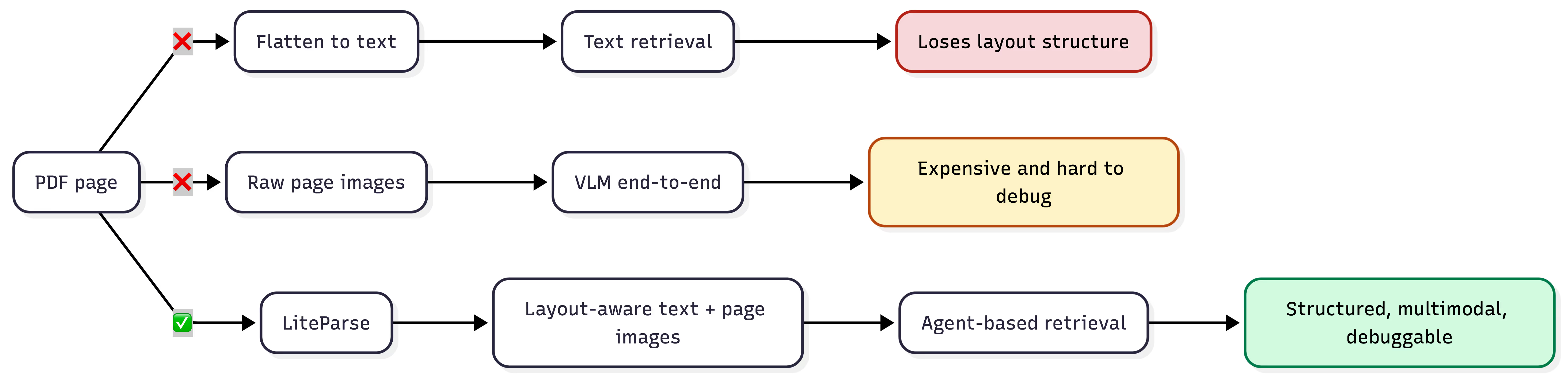
Consider a medication side-effects table where "depression" appears both as a reason for prescribing a drug and as a side effect of another. Once the parser flattens that table into a text stream, column identity is lost, and no amount of prompt engineering recovers it. The way the data is stored matters.
An alternative is to pass raw pages as images to a vision language model (VLM) and let the model handle both parsing and reasoning in a single call. This sidesteps the structure problem, but at significant cost: VLM inference is expensive per-page, degrades over long documents, and is difficult to evaluate systematically. Depending on the complexity of the PDF page, it may focus on the wrong section of the page during retrieval. This is because it treats a parsing problem as a reasoning problem.
The typical PDF QA pipeline conflates three concerns that should be separated: parsing (extracting structured content from the document), retrieval (surfacing relevant chunks for a given query), and reasoning (synthesizing an answer). Collapsing these into a single model call limits scalability, debuggability, and the range of questions the system can handle.
The diagram below summarizes these different approaches.
LiteParse: Local, Layout-Aware PDF Parsing
LiteParse is LlamaIndex's open-source, layout-aware document parser. It was released in March 2026 and built specifically for agent workflows. It runs locally and produces layout-aware text with spatial metadata that downstream components can rely on.
The central design decision in LiteParse is spatial text parsing via grid projection. Most parsers attempt to convert tables and structured layouts into Markdown, which breaks on merged cells, multi-level headers, and irregular grids. LiteParse takes a different approach: it projects extracted text onto a virtual character grid that preserves the visual layout of the original page. The assumption is that LLMs already know how to read spatially-formatted tables from their training data. So the parser's job is to preserve that structure faithfully, not to interpret it.
This matters for agent pipelines because it separates parsing from reasoning. In a typical OCR-plus-agent flow, the agent receives flattened text and has to infer layout, repair extraction errors, and reconstruct structure on every query. That work is slow, expensive, and non-reproducible. LiteParse produces a deterministic, structured substrate – the agent reasons on top of it rather than through it.
Below, we list the key capabilities relevant to this pipeline:
- Selective OCR: Native PDF text extraction is the default path. OCR (via Tesseract.js) only triggers on pages with no extractable text or garbled character mappings. Born-digital PDFs skip the OCR stage entirely.
- Page screenshots: LiteParse renders high-resolution page images via PDFium alongside the text extraction. This enables a multimodal fallback: the agent can escalate visually complex pages to a vision model without re-processing the document.
- Structured output: Results include per-page text, bounding boxes, font metadata, and image data as JSON. Downstream chunking and embedding operate on this structured representation, not raw strings.
- Local execution: No cloud dependencies or API keys. Relevant for teams handling sensitive documents or deploying in constrained environments.
LiteParse ships as a TypeScript/Python library and CLI, installable via npm, pip, or Homebrew. For a full reference, see the documentation.
Why LanceDB?
In this workflow, LiteParse produces two outputs per page: structured text and a high-resolution screenshot. A natural storage model is to treat each page as a row in a table – text, embedding vector, and raw image bytes side by side. LanceDB makes this straightforward because it stores multimodal data natively. There is no need for a separate vector database, a metadata store, and an object store for images. Text chunks, embeddings, and page screenshots live in a single Lance table.
This has practical benefits beyond convenience. Because the image is versioned alongside the structured metadata in the same row, governance is simpler – there is no drift between what the retrieval layer returns and what the source document actually contains. At query time, a single fetch can return the text chunk and its embedding for fast similarity search, or include the image bytes when the agent needs visual context. The retrieval layer decides what to pull based on the query, without orchestrating across multiple storage backends.
LanceDB is also local and embedded, which pairs well with LiteParse's local-first design. The full pipeline – parsing, storage, and retrieval – runs on a single machine with no external service dependencies. And LanceDB supports both vector search and hybrid search (vector + full-text) out of the box, which matters for document QA where exact term matching and semantic similarity serve different query types.
Dataset: A Medication Side Effects Factsheet
The dataset for this project is a two-page PDF from MedStar Visiting Nurse Association. This is a factsheet that maps 11 medication categories to their generic names, brand names, and common side effects.
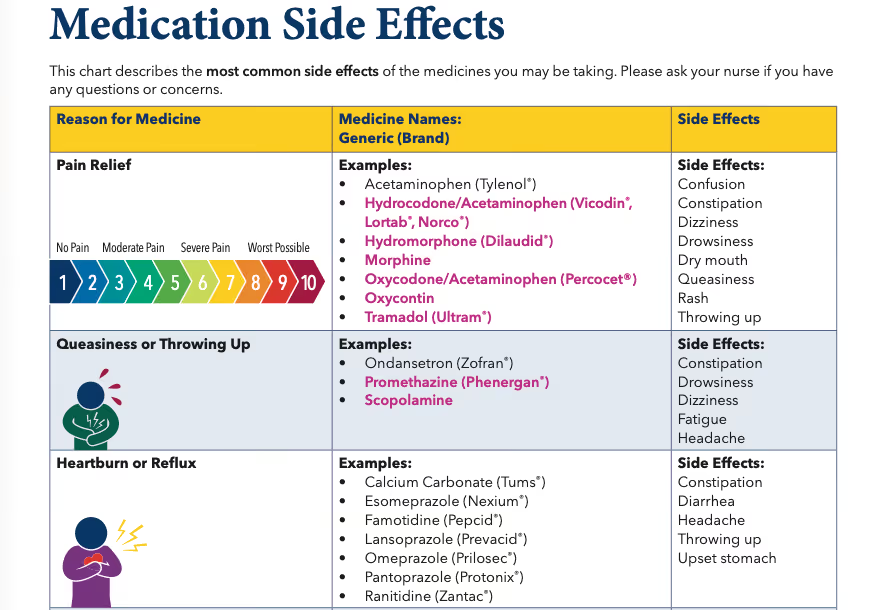
The PDF is not without inherent structure. There are three columns: Reason for Medicine, Medicine Names: Generic (Brand), and Side Effects. Each row represents a medication category (e.g., "Pain Relief", "Lowers Blood Pressure") rather than an individual drug. Some categories contain sub-headers – "Lowers Blood Pressure" groups drugs under ACE Inhibitors, ARBs, and Diuretics – and several drugs lack brand names entirely (Morphine, Aspirin, Heparin).
Although this is a small document, it provides a reasonable level of difficulty for an agent-based QA system. The challenges are structural, not related to volume:
- Synonym mismatch: The PDF uses terms like "Queasiness or Throwing Up" and "Helps With Inflammation" – whereas users may ask about "nausea" and "anti-inflammatory drugs." Exact term matching fails; the system needs semantic bridging.
- Column disambiguation: "Queasiness" appears both as a reason for medicine (a category name) and as a side effect of Pain Relief drugs. "Throwing up" shows up in five separate side effect lists and one category name. The system must distinguish between these roles based on column position, not string matching.
- Near-duplicate categories: "Lowers Blood Pressure" and "Lowers Blood Pressure and Heart Rate" are distinct categories with different drugs and different side effects. A retrieval system that conflates them will produce incorrect answers – particularly on negation or boolean-response questions (e.g., "Is headache a side effect of the category that Losartan belongs to?")
- Category-level side effects: Side effects are listed per category, not per drug. The system must not fabricate per-drug distinctions that the source document does not make.
- Cross-category reasoning: Questions like "which side effects overlap between blood thinners and cholesterol medications?" require retrieving from multiple categories and computing set intersections – something a single vector search call cannot do.
The eval suite (covered later) targets these exact challenges across 20 questions in seven categories: direct lookup, synonym resolution, brand/generic mapping, cross-category reasoning, negation, aggregation, and disambiguation.
Preprocessing: From PDF to LanceDB
The preprocessing pipeline transforms the raw PDF into indexed, retrievable rows in LanceDB. It runs as a single function with four stages: parse, chunk, screenshot, and store. The full implementation is in processing.ts.
Parsing and Chunking
LiteParse handles the first stage. A single parse() call extracts layout-aware text per page – no OCR needed here since this is a born-digital PDF with extractable text. The output is then passed through Chonkie's RecursiveChunker to split each page's text into chunks of up to 4096 characters.
import { LiteParse } from "@llamaindex/liteparse";
import { RecursiveChunker } from "@chonkiejs/core";

const PARSER = new LiteParse();

async function parseAndChunk(filePath: string): Promise<Map<number, string[]>> {
  const result = await PARSER.parse(filePath);
  const chunker = await RecursiveChunker.create({ chunkSize: 4096 });

  const pages: Map<number, string[]> = new Map();
  for (const r of result.pages) {
    const chunks = await chunker.chunk(r.text);
    pages.set(r.pageNum, chunks.map((c) => c.text));
  }
  return pages;
}
For this two-page PDF, the chunking is straightforward – each page fits within the chunk size limit, so the output is essentially one chunk per page. The spatial layout that LiteParse preserves in the extracted text means column relationships survive into the chunk: the agent can still see that "Dizziness" sits under the "Side Effects" column, not the "Reason for Medicine" column.
Page Screenshots
In parallel, LiteParse renders a high-resolution PNG screenshot of each page via its screenshot() API. These screenshots are stored to disk and linked to their corresponding text chunks by page number.
const result = await PARSER.screenshot(filePath);
for (const r of result) {
  const imagePath = `screenshots/${basename}_page_${r.pageNum}.png`;
  await fs.writeFile(imagePath, r.imageBuffer);
}
This is the multimodal fallback mechanism. When the agent's text-based search returns insufficient context – for instance, on aggregation questions that span the entire table – it can retrieve the page screenshot and reason over the visual layout directly.
Embedding and Storage
Each text chunk is embedded using Google's gemini-embedding-2-preview model (3072 dimensions) and then stored in LanceDB alongside the metadata. The schema of the Lance table is defined via Arrow types:
const schema = new arrow.Schema([
  new arrow.Field("id", new arrow.Utf8()),          // screenshot path (unique key)
  new arrow.Field("image", new arrow.Binary()),      // PNG bytes
  new arrow.Field(
    "vector",
    new arrow.FixedSizeList(3072, new arrow.Field("item", new arrow.Float32(), true)),
  ),
  new arrow.Field("text", new arrow.Utf8()),         // chunk text
]);
Each row is a chunk – its text, its embedding, and the screenshot of the page it came from, all in one place. The image bytes are stored as a binary column directly in the Lance table, not as a file path or external reference. This is a nice feature to have, as a single query can return the text for similarity search or the image for visual reasoning, without a second lookup.
After insertion, a vector index is built on the embedding column for fast approximate nearest-neighbor search. We use HNSW-SQ (Hierarchical Navigable Small World with Scalar Quantization), which works well here because recall is important, and this is a small dataset:
await tbl.createIndex("vector", {
  config: lancedb.Index.hnswSq(),
});
For larger-scale deployments, LanceDB also supports IVF-PQ indexes, which trade some recall for significantly lower memory usage – a better fit when indexing millions of chunks. See the LanceDB vector index documentation for a comparison of index types.
The full pipeline – parse → chunk → screenshot → embed → upsert – runs as a single CLI command (bun run process <pdf>). For this two-page PDF, it completes in a few seconds and produces a local .lancedb/ directory ready for retrieval.
The Agent: Retrieval + Reasoning with Claude
With parsing and storage in place, the final layer is an agent that can query the data and reason over it. We use the Claude Agent SDK – Anthropic's open-source TypeScript SDK for building agentic applications on top of Claude. It provides the same tool-use orchestration and multi-turn conversation management that powers Claude Code, exposed as a library. For this project, it was a natural fit: the SDK handles MCP tool registration, extended thinking, and streaming natively in TypeScript. However, you can always pair any agent framework of your choice with LanceDB and LiteParse.
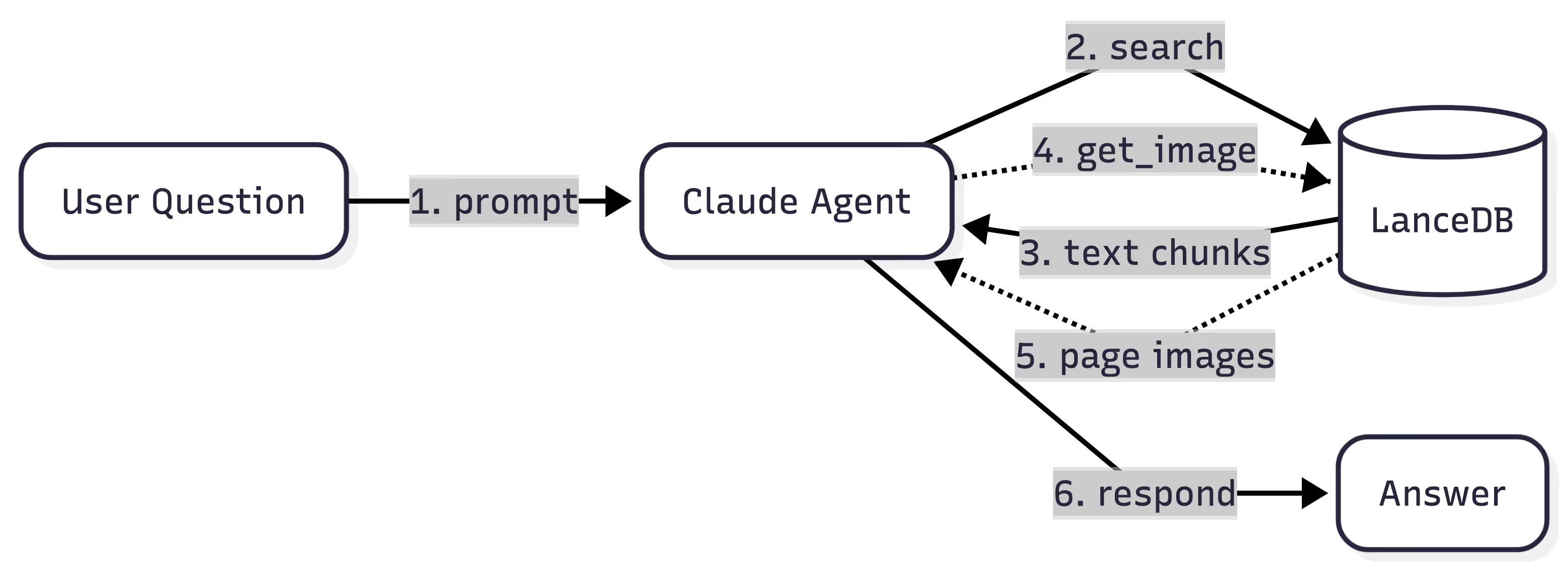
The Claude Agent SDK's core abstraction is query(): an async generator that streams messages as the agent thinks, calls tools, and produces a final answer. The agent is configured with a system prompt, a set of allowed tools, and optional extended thinking. It manages its own conversation history, so multi-turn sessions work without manual state management.
Defining the Tools
The agent interacts with LanceDB through two tools, exposed via MCP (Model Context Protocol). The first is search – a vector similarity search that takes a query string, embeds it, and returns the top matching text chunks along with the path to each chunk's page screenshot:
const mcpSearchTool = tool(
  "search",
  "Search a knowledge base to find the answer to a user's question.",
  {
    query: z.string().describe("Search query"),
    chunkLimit: z.number().int().min(1).optional()
      .describe("Maximum number of text chunks to return."),
  },
  searchTool,
);
The second is get_image – a targeted fetch that retrieves the raw PNG bytes for a specific page screenshot. This is the multimodal escalation path: the agent calls search first, and if the text results are insufficient, it calls get_image with the screenshot path returned from the search to get visual context.
const mcpGetImageTool = tool(
  "get_image",
  "Get the full page screenshot associated with a search result.",
  { imagePath: z.string().describe("Path of the image to read") },
  getImageTool,
);
Both tools are registered on a single MCP server using the SDK:
export const retrievalMcp = createSdkMcpServer({
  name: "retrieval",
  version: "1.0.0",
  tools: [mcpSearchTool, mcpGetImageTool],
});
Configuring the Agent
The agent configuration ties everything together. The system prompt instructs the agent to follow a two-step retrieval strategy – text search first, image fallback when needed – and to ground all answers strictly in retrieved content rather than prior medical knowledge:
export const queryOptions: Options = {
  allowedTools: ["mcp__retrieval__*"],
  permissionMode: "default",
  systemPrompt: systemPrompt,
  mcpServers: {
    retrieval: retrievalMcp,
  },
  thinking: {
    type: "enabled",
    budgetTokens: 1024,
  },
};
The Query Loop
At runtime, query() returns an async stream of messages. The agent autonomously decides when to call tools, how many search rounds to run, and when it has enough context to answer:
for await (const message of query({ prompt, options })) {
  if (message.type === "assistant") {
    // Agent is thinking, responding, or calling a tool
  } else if (message.type === "result") {
    // Final answer (or error)
  }
}
For a question like "How many medication categories list 'Upset stomach' as a side effect?", the trace looks like this:
search("upset stomach side effect"): Returns text chunks, but vector search surfaces only a few of the seven matching categories. So the agent decides to do another tool call to confirm.get_image("screenshots/...page_1.png"): Retrieves the full page screenshot to scan all categories visually.get_image("screenshots/...page_2.png"): Retrieves page two.- Respond: Counts seven categories across both pages, grounded in the visual layout.
The agent decides the retrieval strategy per-question. Simple lookups need one search call. Cross-category reasoning may require two or three. And when text alone is ambiguous – for instance, when determining whether a term appears as a column header or a cell value – the agent escalates to get_image to inspect the visual layout of the page. Depending on the quality of the underlying model in the agent, fewer or more tools calls may be required to produce the final answer.
Eval Results: 20 Questions, 7 Categories
To measure how well this pipeline handles the challenges described above, we built a 20-question eval suite (provided here) that spans seven categories. Each question targets a specific failure mode – synonym resolution, column disambiguation, cross-category reasoning, and so on. Answer types include set matching (scored by F1), boolean (exact match), numeric (exact match), and free text (LLM-as-judge with a rubric).
Results by Category
The agent manages to score 84.4% across all the categories. Five of seven categories score at or near 100%.
Per-Question Results
The table below shows the number of tool calls each question required. For harder question, the agent chooses to call more tools to gather more context.
The section below discusses some of these results.
Analysis
Where the system excels: The agent does really well at direct lookup, disambiguation, negation, cross-category reasoning, and synonym resolution. These require precise retrieval and multi-step reasoning – exactly what the separated architecture is designed for. It also correctly distinguishes near-duplicate categories ("Lowers Blood Pressure" vs. "Lowers Blood Pressure and Heart Rate"), maps user language to PDF terminology ("nausea" → "Queasiness or Throwing Up"), and computes set intersections across categories.
Where it struggles (and why):
AG-01: "How many total unique side effects are listed across the entire chart?" – The agent made 7 search calls and retrieved the page screenshot, but still miscounted. The problem is fundamental: vector search cannot guarantee exhaustive coverage of all 11 categories, and even with the image fallback, counting 21 unique items across a dense two-page table while deduplicating near-duplicates ("Rash" vs. "Rash/flushing") is error-prone for a vision model. This is a case where a SQL query over a normalized schema (SELECT COUNT(DISTINCT side_effect) FROM ...) would be trivial.
AG-03: "How many medication categories list 'Upset stomach' as a side effect?" – Similar issue: the correct answer is 7, but the agent undercounted. A text search for "upset stomach" surfaces some matching categories, but not all seven. The agent escalated to image retrieval but still missed categories where "Upset stomach" appears in a visually dense region of the table.
BG-01: "What is Xanax used for?" – The agent needed to resolve the brand name Xanax to the generic Alprazolam, locate it in the "Calms Nerves or Makes You Sleepy" category, and return that category name. The chain of lookups failed at the retrieval step – the initial search didn't surface the right chunk, and the agent couldn't recover from there.
The following general pattern is observed: the pipeline handles targeted, scoped questions well, but struggles with exhaustive aggregation over the full document. This is an inherent limitation of vector search as a retrieval mechanism – it's designed for relevance ranking, not completeness. Adding an extra structured query tool (SQL over a normalized schema derived from the parsed output) would address this gap directly by allowing the agent to decide what would be most useful.
What We Learned
Structure preservation compounds: The decision to use LiteParse's spatial text output – rather than flattening to Markdown or plain text – paid off across the entire pipeline. Column identity survived chunking, retrieval returned context the agent could trust, and disambiguation questions that would break a flat-text pipeline scored 100%. If you can only invest in one part of a document QA system, invest in upstream data quality via better parsing.
Multimodal fallback is worth the complexity: Storing page screenshots alongside text chunks in LanceDB added minimal overhead at ingestion time, but gave the agent a reliable escape hatch. Half the eval questions triggered image retrieval – not because text search failed outright, but because the agent used visual context to verify or expand on text results. The cost per image call is higher, but the alternative is an incorrect answer.
Vector search is for relevance, not completeness: The aggregation failures make this clear. When a question requires exhaustive coverage of a document ("count every category that lists X"), vector similarity search cannot guarantee it will surface all matching chunks. This is a fundamental property of approximate nearest-neighbor retrieval, not a bug in the implementation. For production systems, pairing vector search with a structured query tool (SQL over a normalized schema), or a graph query tool (that can traverse paths) would cover this gap.
Build the eval suite early: The 20-question eval was as valuable as the pipeline itself. It exposed failure modes – near-duplicate category names, brand-to-generic resolution chains, exhaustive counting – that manual testing would not have caught. Each category targets a specific architectural challenge, making it straightforward to diagnose whether a failure is a parsing problem, a retrieval problem, or a reasoning problem.
Local-first tooling simplifies iteration: LiteParse, LanceDB, and the Claude Agent SDK are all open source tools/packages that run locally with no external service dependencies beyond the embedding and inference APIs. This made the development loop fast: change the chunking strategy, re-run bun run process, re-run the eval, and compare scores. No deployment step, no infrastructure to manage, no cold starts.
Try It Yourself
The full source code is available on GitHub: run-llama/llamaindex-lancedb-medqa.
While the implementation shown used TypeScript end-to-end with the Claude Agent SDK, the approach is not tied to any particular language, agent framework, or model. Both LiteParse and LanceDB offer Python SDKs, so the same pipeline translates directly if Python is your stack. And the reasoning layer is fully swappable – you can wire LiteParse and LanceDB into any agent orchestration layer that supports tool use.
LiteParse is developed by the team behind LlamaIndex – if you're already using LlamaIndex Cloud for your parsing or agent workflows, LiteParse slots in as the "local parsing layer" with minimal integration effort. LanceDB provides the multimodal storage and retrieval layer that ties text, multimodal assets and embeddings together in one place. This example showed how to use LanceDB OSS locally, but for production deployments requiring managed infrastructure, access control, and scalability, LanceDB Enterprise offers a hosted solution with the same API surface.
If you're building document QA over PDFs that are more than just plain text (tables, mixed layouts, semi-structured content, etc.), this stack should meet all your needs. Just ensure that you build your own evals that meet your domain requirements. When it comes to building agent pipelines, understanding how they fail is as useful as watching them succeed! 🚀