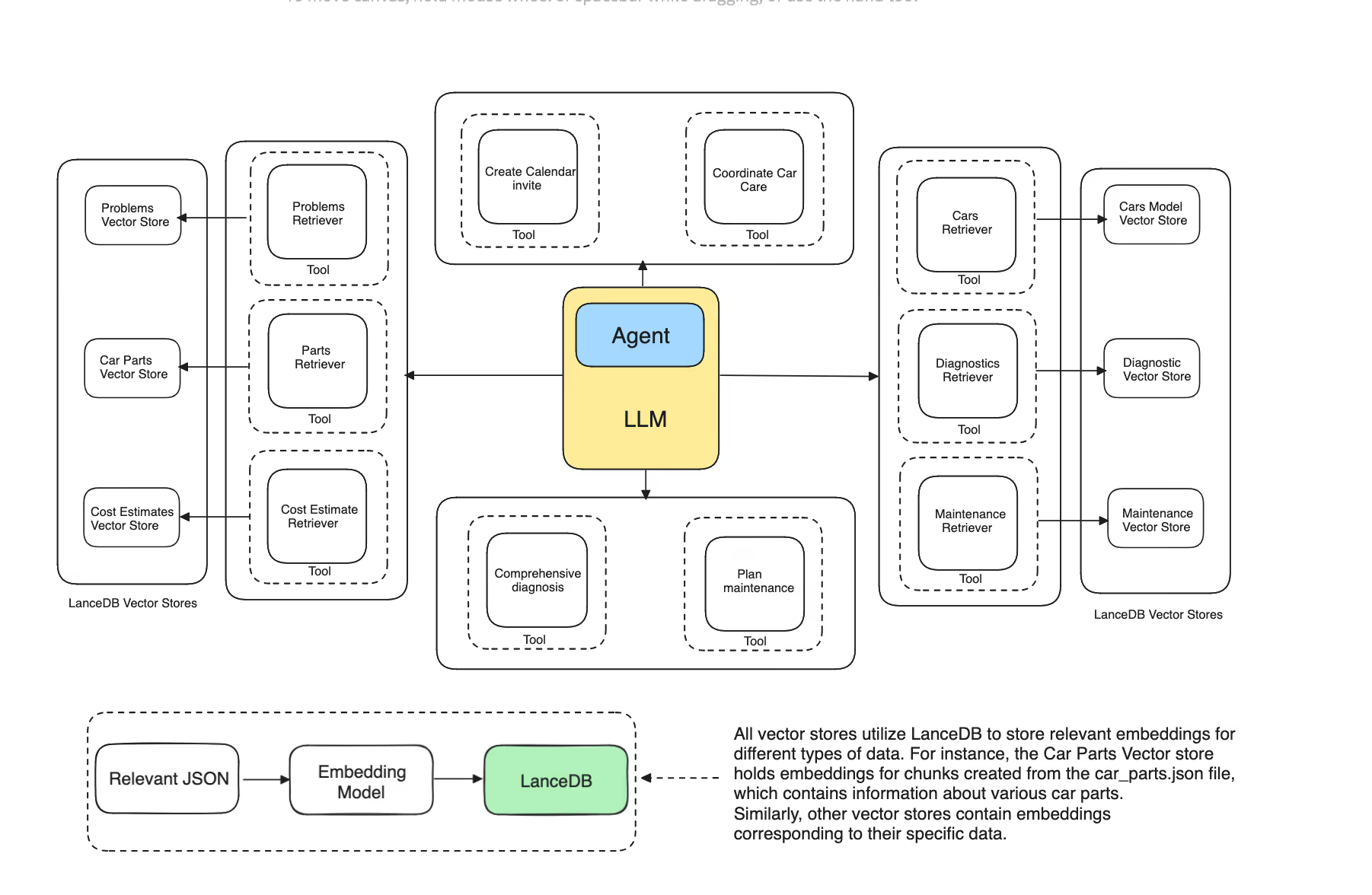
Agentic RAG (Retrieval-Augmented Generation) brings a notable improvement in how information is managed. While traditional RAG systems focus on retrieving relevant data and delivering it to a language model (LLM) for generating responses, Agentic RAG goes beyond that by introducing a higher level of autonomy. The system now does more than just gather data; it can also make decisions and take action independently.
This represents a move from basic tools to more sophisticated, intelligent systems. With Agentic RAG, the process evolves from passive to active, enabling AI logic to pursue specific objectives without constant supervision.
How Does an Agentic RAG Work?
Agentic RAG is built on this same idea. Unlike regular RAG systems that just retrieve information, Agentic RAG uses intelligent strategies to ensure the system provides the best response. It goes beyond offering a basic, context-aware answer. These agents carefully analyze the query, choose the best approach, and deliver a more nuanced and well-thought-out reply.
Agentic RAG is built on this same idea. Unlike regular RAG systems that just retrieve information, Agentic RAG uses intelligent strategies to ensure the system provides the best response. It goes beyond offering a basic, context-aware answer. These agents carefully analyze the query, choose the best approach, and deliver a more nuanced and well-thought-out reply.
How to use it?
Here’s how we can build a specialized RAG agent for automotive needs. Imagine you’re facing car troubles and need guidance—this agent would help you to:
- Diagnose Issues: Understand and analyze your car’s symptoms.
- Provide Solutions: Offer possible causes and suggest fixes.
- Organize Maintenance: Keep track of your car’s upkeep needs.
To help our agent quickly access and use the information, we’ll store pieces of data from six JSON files. Here’s a summary of what each file contains:
- car_maintenance.json: Maintenance schedules and tasks based on mileage.
- car_problems.json: Descriptions of common car issues, including required parts and repair time.
- car_parts.json: A list of parts, categorized by type, brand, and other attributes.
- car_diagnosis.json: Diagnostic steps, potential causes, and recommended actions.
- car_cost_estimates.json: Cost estimates for repairs based on identified problems.
- car_models.json: Specific issues common to certain car models.
You can get your JSON files here: vectordb-recipes: multi-document-agentic-rag/json_files
How to: Tech Stack
To build our Agentic agent, we’ll be using a few key tools to make things run smoothly:
- LlamaIndex : This framework will serve as the core of our agent. It helps manage the agent’s logic and operations. While the details might seem vague now, their role will become clearer as we implement the system.
- Memory Management: Our agent will need to remember past interactions. Currently, it processes each question in isolation without tracking previous conversations. To fix this, we’ll use memory to record the chat history. This history will be stored in a conversational memory buffer, managed by LlamaIndex, allowing the agent to refer back to both past and current interactions when making decisions.
- Vector Databases: We’ll use VectorDBs to retrieve information. Queries will be embedded and matched semantically with the relevant VectorDB through our retrievers.
- LLM Integration: On the language model side, we’ll go with OpenAI’s GPT-4 for generating responses. For embeddings, we’re using
sentence-transformers/all-MiniLM-L6-v2
Make sure your .env file includes the OPENAI_API_KEY. You can adjust and use different LLMs and embedding models as needed. The key is to have an LLM for reasoning and an embedding model to handle data embedding
Follow along with the Colab.
Step 1: Creating our DBs
Let’s set up our vector database to store the data. Here’s an example of creating a singleton LanceDB vector store with multiple tables, each storing different types of embedded data.
# Vector store setup
problems_vector_store = LanceDBVectorStore(
    uri='./lancedb',
    table_name='problems_table',
    mode="overwrite",
)
Since we’re dealing with different types of information, we’ll use multiple tables to organize and retrieve our data efficiently. Just as we created a separate table for our problem file, we’ll do the same for our other data files. Now that our LanceDB table is set up, the next step is to create a retriever object that will focus on a specific table to access the relevant information.
def load_and_index_document_from_file(file_path: str, vector_store: LanceDBVectorStore) -> VectorStoreIndex:
    """Load a document from a single file and index it."""
    with open(file_path, 'r') as f:
        data = json.load(f)
        document = Document(text=json.dumps(data))

    parser = SentenceSplitter(chunk_size=1024, chunk_overlap=200)
    nodes = parser.get_nodes_from_documents([document])
    storage_context = StorageContext.from_defaults(vector_store=vector_store)
    return VectorStoreIndex(nodes, storage_context=storage_context)

def create_retriever(index: VectorStoreIndex) -> VectorIndexRetriever:
    """Create a retriever from the index."""
    return index.as_retriever(similarity_top_k=5)

# Load and index documents directly from file paths
problems_index = load_and_index_document_from_file("/content/drive/MyDrive/multi-document-rag/problems.json", problems_vector_store)

# Creating our retriever
problems_retriever = create_retriever(problems_index)
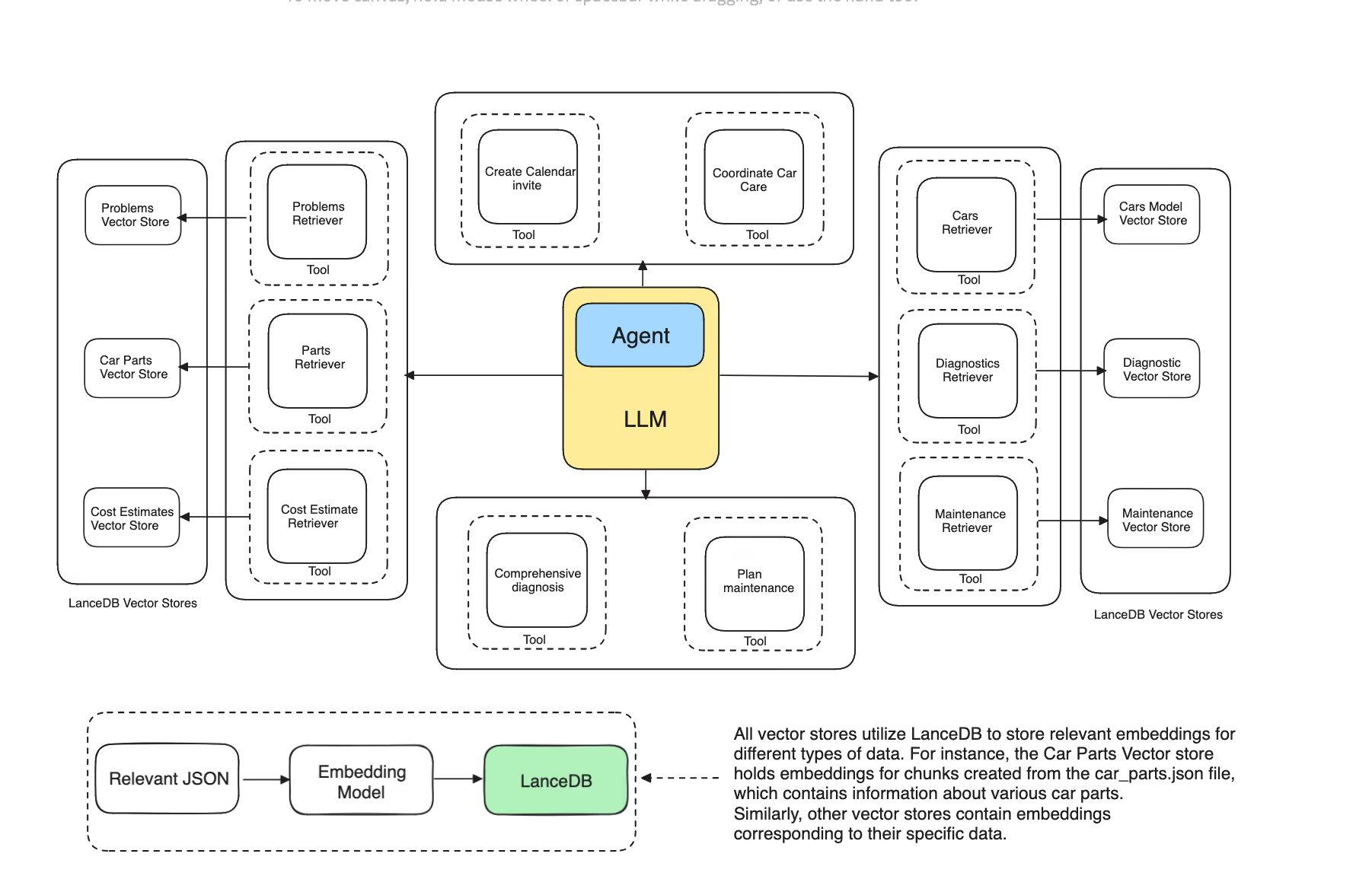
Each retriever is linked to a specific LanceDB table, with one index for each table. Each Vector DB offers a retriever instance—a Python object that returns a list of documents matching a query. For instance, the problems_retriever will get documents about car problems, while the cars_retriever will find common issues faced by vehicle owners.
In case the bot misses information or seems to hallucinate, it might be due to missing data in our JSON files.
Step 2: Creating our Agentic tools
Well, LlamaIndex agents are built to process natural language inputs and execute actions, rather than just generating responses. The effectiveness of these agents depends on how well we abstract and utilize tools. But what does ‘tool’ mean in this context? Think of tools as the specialized equipment a warrior uses in battle. Just as a warrior selects different weapons based on the situation, tools for our agent are specialized API interfaces that enable the agent to interact with data sources or reason through queries to provide the best possible responses.
In LlamaIndex, tools come in various types.
There is this one FunctionTool, which turns any user-defined function into a tool, making it capable of understanding the function’s schema and usage. These tools are crucial for enabling our agents to reason about queries and take effective actions.
As we use different tools, it’s important to clearly describe its purpose and functionality so the agent can use it effectively. To get started, we’ll create tools that leverage the retriever objects we defined earlier. For reference, let’s create our first tool, which will help us retrieve relevant problems for a specific car.
max_context_information = 200

def retrieve_problems(query: str) -> str:
    """Searches the problem catalog to find relevant automotive problems for the query."""
    docs = problems_retriever.retrieve(query)
    information = str([doc.text[:max_context_information] for doc in docs])
    return information

retrieve_problems_tool = FunctionTool.from_defaults(fn=retrieve_problems)
Similarly, we can create such tools for all our retrievers.
parts_index = load_and_index_document_from_file("/content/drive/MyDrive/multi-document-rag/parts.json", parts_vector_store)
cars_index = load_and_index_document_from_file("/content/drive/MyDrive/multi-document-rag/cars_models.json", cars_vector_store)
diagnostics_index = load_and_index_document_from_file("/content/drive/MyDrive/multi-document-rag/diagnostics.json", diagnostics_vector_store)
cost_estimates_index = load_and_index_document_from_file("/content/drive/MyDrive/multi-document-rag/cost_estimates.json", cost_estimates_vector_store)
maintenance_schedules_index = load_and_index_document_from_file("/content/drive/MyDrive/multi-document-rag/maintenance.json", maintenance_schedules_vector_store)

parts_retriever = create_retriever(parts_index)
cars_retriever = create_retriever(cars_index)
diagnostics_retriever = create_retriever(diagnostics_index)
cost_estimates_retriever = create_retriever(cost_estimates_index)
maintenance_schedules_retriever = create_retriever(maintenance_schedules_index)
With the retriever tools now set up, our agent can effectively select the appropriate tool based on the query and fetch the relevant contexts. Next, we’ll create additional helper tools that will complement the existing ones, providing the agent with more context and enhancing its reasoning capabilities. Here is the description of the helper tools that we are going to use
comprehensive_diagnosis: Generates a detailed diagnosis report based on car symptoms, including possible causes, estimated repair costs, and required parts.plan_maintenance: Develop a maintenance plan based on the car’s mileage and details, outlining common issues and estimated time for tasks.create_calendar_invite: Creates a simulated calendar invite for a car maintenance or repair event, scheduling it for the next week.coordinate_car_care: Integrates diagnosis, maintenance planning, and scheduling based on user queries to provide a comprehensive car care plan.
Refer to the Colab notebook for complete code and detailed implementation.
Additionally, we’ll implement some helper functions that, while not tools themselves, will be used internally within the tools to support the logic and enhance their functionality. Like a tool that can get us information about a car based on the mileage, its care make year, model, and all.
Here are the additional tools in their complete form
comprehensive_diagnostic_tool = FunctionTool.from_defaults(fn=comprehensive_diagnosis)
maintenance_planner_tool = FunctionTool.from_defaults(fn=plan_maintenance)
calendar_invite_tool = FunctionTool.from_defaults(fn=create_calendar_invite)
car_care_coordinator_tool = FunctionTool.from_defaults(fn=coordinate_car_care)
retrieve_car_details_tool = FunctionTool.from_defaults(fn=retrieve_car_details)
Now, let’s combine all these tools into a comprehensive tools list, which we will pass to our agent to utilize.
tools = [
    retrieve_problems_tool,
    retrieve_parts_tool,
    diagnostic_tool,
    cost_estimator_tool,
    maintenance_schedule_tool,
    comprehensive_diagnostic_tool,
    maintenance_planner_tool,
    calendar_invite_tool,
    car_care_coordinator_tool,
    retrieve_car_details_tool
]
Step 4: Creating the Agent
Now that we’ve defined the tools, we’re ready to create the agent. With LlamaIndex, this involves setting up an Agent reasoning loop. Basically, this loop allows our agent to handle complex questions that might require multiple steps or clarifications. Essentially, our agent can reason through tools and complete tasks across several stages.
LlamaIndex provides two main components for creating an agent: AgentRunner and AgentWorkers.
The AgentRunner acts as the orchestrator, like in a symphony, managing the overall process. It handles the current state, conversational memory, and tasks, and it runs steps for each task while providing a high-level user interface on what’s going on. On the other hand, AgentWorkers are responsible for the operational side. They select and use the tools and choose the LLM to interact with these tools effectively.
Now, let’s set up both the AgentRunner and AgentWorker to bring our agent to life.
# Function to reset the agent's memory
def reset_agent_memory():
    global agent_worker, agent
    agent_worker = FunctionCallingAgentWorker.from_tools(
        tools,
        llm=llm,
        verbose=True
    )
    agent = AgentRunner(agent_worker)

# Initialize the agent
reset_agent_memory()
Every time you call reset_agent_memory(), a new, fresh agent is created, ready to reason through and act on the user’s query.
With everything now set up—our tools, an agent for reasoning, and databases for retrieving relevant context—let’s test to see if our agent can handle simple questions effectively.
Step 5: D-Day
Let’s ask the agent a straightforward question related to car maintenance based on the mileage count and see how well it handles it.
response = agent.query(
    "My car has 60,000 miles on it. What maintenance should I be doing now, and how much will it cost?"
)
and the response I got is
Added user message to memory: My car has 60,000 miles on it. What maintenance should I be doing now, and how much will it cost?
=== Calling Function ===
Calling function: get_maintenance_schedule with args: {"mileage": 60000}

=== Calling Function ===
Calling function: estimate_repair_cost with args: {"problem": "Oil and filter change"}

=== Calling Function ===
Calling function: estimate_repair_cost with args: {"problem": "Tire rotation"}

=== Calling Function ===
Calling function: estimate_repair_cost with args: {"problem": "Air filter replacement"}

=== Calling Function ===
Calling function: estimate_repair_cost with args: {"problem": "Brake inspection"}

=== LLM Response ===
At 60,000 miles, the recommended maintenance tasks for your car are:

1. Oil and filter change: This typically costs around $250.
2. Tire rotation: The average cost for this service is around $50.
3. Air filter replacement: This usually costs about $70.
4. Brake inspection: The cost for this can vary, but it's typically around $100.

Please note that these are average costs and can vary based on your location and the specific make and model of your car. It's always a good idea to get a few quotes from different service providers.
Well, this is amazing! The agent effectively understood the query and provided an excellent response. Notice how it was first called the maintenance_schedule_tool, which utilized the get_maintenance_schedule retriever object to gather context on the relevant maintenance schedule, including different tasks based on the car’s mileage. This context was then used by the cost_estimator_tool
The best part is that it passed the relevant parameters—problems extracted from the maintenance_schedule_tool—to the cost estimator tool, deciding on its own based on the user query. Finally, with all the gathered context, it produced a comprehensive response that perfectly addresses the user’s needs.
Btw, If you want the agent to retain the context of previous conversations, replace .query them with .chat to ensure context is preserved. Keep in mind that the context size is limited by the information you provide when calling the retrievers. Watch out for the max_context_information parameters in the retrievers to avoid exceeding the token limits for the LLMs.
And that’s it! You’ve successfully created an agentic RAG that not only understands the user’s query but also delivers a well-reasoned and contextually accurate answer. Here is the Colab for your reference.