
In our previous article, we explored the remarkable capabilities of the Lance format, a modern, columnar data storage solution designed to revolutionize the way we work with large image datasets in machine learning. For the same purpose, I have converted the cinic and mini-imagenet datasets to their lance versions. For this write-up, I will use the example of cinic dataset to explain how to convert any image dataset into the Lance format with a single script and unlocking the full potential of this powerful technology.
Just in case, here are the cinic and mini-imagenet datasets in lance.
Processing Images
The process_images function is the heart of our data conversion process. It is responsible for iterating over the image files in the specified dataset, reading the data of each image, and converting it into a PyArrow RecordBatch object on the binary scale. This function also extracts additional metadata, such as the filename, category, and data type (e.g., train, test, or validation), and stores it alongside the image data.
def process_images(data_type):
    # Get the current directory path
    images_folder = os.path.join("mini_imagenet", data_type)

    # Define schema for RecordBatch
    schema = pa.schema([
        ('image', pa.binary()),
        ('filename', pa.string()),
        ('category', pa.string()),
        ('data_type', pa.string())
    ])

    # Iterate over the categories within each data type
    for category in os.listdir(images_folder):
        category_folder = os.path.join(images_folder, category)

        # Iterate over the images within each category
        for filename in tqdm(os.listdir(category_folder), desc=f"Processing {data_type} - {category}"):
            # Construct the full path to the image
            image_path = os.path.join(category_folder, filename)

            # Read and convert the image to a binary format
            with open(image_path, 'rb') as f:
                binary_data = f.read()

            image_array = pa.array([binary_data], type=pa.binary())
            filename_array = pa.array([filename], type=pa.string())
            category_array = pa.array([category], type=pa.string())
            data_type_array = pa.array([data_type], type=pa.string())

            # Yield RecordBatch for each image
            yield pa.RecordBatch.from_arrays(
                [image_array, filename_array, category_array, data_type_array],
                schema=schema
            )
By leveraging the PyArrow library, the process_images function ensures that the image data is represented in a format that is compatible with the Lance format. The use of RecordBatch objects allows for efficient data structuring and enables seamless integration with the subsequent steps of the conversion process.
One of the key features of this function is its ability to handle datasets with a hierarchical structure. It iterates over the categories within each data type, ensuring that the metadata associated with each image is accurately captured and preserved. This attention to detail is crucial, as it allows us to maintain the rich contextual information of our image dataset, which can be invaluable for tasks like classification, object detection, or semantic segmentation.
Writing to Lance
The write_to_lance function takes the data generated by the process_images function and writes it to Lance datasets, one for each data type (e.g., train, test, validation). This step is where the true power of the Lance format is unleashed.
The function first creates a PyArrow schema that defines the structure of the data to be stored in the Lance format. This schema includes the image data, as well as the associated metadata (filename, category, and data type). By specifying the schema upfront, the script ensures that the data is stored in a consistent and organised manner, making it easier to retrieve and work with in the future.
def write_to_lance():
    # Create an empty RecordBatchIterator
    schema = pa.schema([
        pa.field("image", pa.binary()),
        pa.field("filename", pa.string()),
        pa.field("category", pa.string()),
        pa.field("data_type", pa.string())
    ])

    # Specify the path where you want to save the Lance files
    images_folder = "mini_imagenet"

    for data_type in ['train', 'test', 'val']:
        lance_file_path = os.path.join(images_folder, f"mini_imagenet_{data_type}.lance")

        reader = pa.RecordBatchReader.from_batches(schema, process_images(data_type))
        lance.write_dataset(
            reader,
            lance_file_path,
            schema,
        )
Next, the function iterates through the different data types, creating a Lance dataset file for each one. The lance.write_dataset function is then used to write the RecordBatchReader, generated from the process_images function, to the respective Lance dataset files.
The benefits of this approach are numerous. By storing the data in the Lance format, you can take advantage of its columnar storage and compression techniques, resulting in significantly reduced storage requirements. Additionally, the optimized data layout and indexing capabilities of Lance enable lightning-fast data loading times, improving the overall performance and responsiveness of your machine learning pipelines.
Loading into Pandas
The final step in the process is to load the data from the Lance datasets into Pandas DataFrames, making the image data easily accessible for further processing and analysis in your machine learning workflows.
The loading_into_pandas function demonstrates this process. It first locates the Lance dataset files, created in the previous step, and creates a Lance dataset object for each data type. The function then iterates over the batches of data, converting them into Pandas DataFrames and concatenating them into a single DataFrame for each data type.
def loading_into_pandas():
    # Load Lance files from the same folder
    current_dir = os.getcwd()
    images_folder = os.path.join(current_dir, "cinic")

    data_frames = {}  # Dictionary to store DataFrames for each data type

    for data_type in ['test', 'train', 'val']:
        uri = os.path.join(images_folder, f"cinic_{data_type}.lance")

        ds = lance.dataset(uri)

        # Accumulate data from batches into a list
        data = []
        for batch in tqdm(
            ds.to_batches(columns=["image", "filename", "category", "data_type"], batch_size=10),
            desc=f"Loading {data_type} batches",
        ):
            tbl = batch.to_pandas()
            data.append(tbl)

        # Concatenate all DataFrames into a single DataFrame
        df = pd.concat(data, ignore_index=True)

        # Store the DataFrame in the dictionary
        data_frames[data_type] = df

        print(f"Pandas DataFrame for {data_type} is ready")
        print("Total Rows: ", df.shape[0])

    return data_frames
This approach offers several advantages. By loading the data in batches, the function can efficiently handle large-scale image datasets without running into memory constraints. Additionally, the use of Pandas DataFrames provides a familiar and intuitive interface for working with the data, allowing you to leverage the rich ecosystem of Pandas-compatible libraries and tools for data manipulation, visualization, and analysis.
Moreover, the function stores the DataFrames in a list, indexed by the data type. This structure enables us to easily access the specific subsets of your dataset (e.g., train, test, validation) as needed, further streamlining your machine learning workflows. I mean it’s too smooth guys.
Putting It All Together
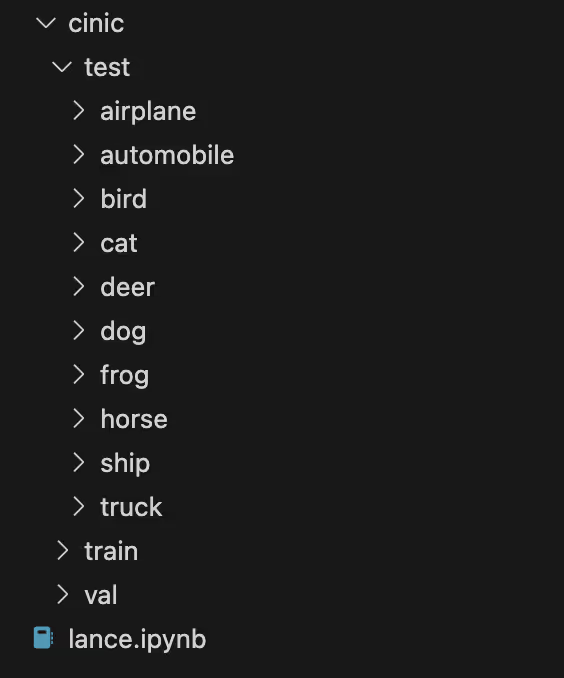
By running the provided script, you can convert your image datasets, whether they are industry-standard benchmarks or your own custom collections, into the powerful Lance format. This transformation unlocks a new level of efficiency and performance, empowering you to supercharge your machine learning projects. I have used the same script for the mini-imagenet too, make sure your data directory looks like this
here is the complete script for your reference…
import os
import pandas as pd
import pyarrow as pa
import lance
import time
from tqdm import tqdm

def process_images(data_type):
    # Get the current directory path
    images_folder = os.path.join("cinic", data_type)

    # Define schema for RecordBatch
    schema = pa.schema([
        ('image', pa.binary()),
        ('filename', pa.string()),
        ('category', pa.string()),
        ('data_type', pa.string()),
    ])

    # Iterate over the categories within each data type
    for category in os.listdir(images_folder):
        category_folder = os.path.join(images_folder, category)

        # Iterate over the images within each category
        for filename in tqdm(os.listdir(category_folder), desc=f"Processing {data_type} - {category}"):
            # Construct the full path to the image
            image_path = os.path.join(category_folder, filename)

            # Read and convert the image to a binary format
            with open(image_path, 'rb') as f:
                binary_data = f.read()

            image_array = pa.array([binary_data], type=pa.binary())
            filename_array = pa.array([filename], type=pa.string())
            category_array = pa.array([category], type=pa.string())
            data_type_array = pa.array([data_type], type=pa.string())

            # Yield RecordBatch for each image
            yield pa.RecordBatch.from_arrays(
                [image_array, filename_array, category_array, data_type_array],
                schema=schema,
            )

# Function to write PyArrow Table to Lance dataset
def write_to_lance():
    # Create an empty RecordBatchIterator
    schema = pa.schema([
        pa.field("image", pa.binary()),
        pa.field("filename", pa.string()),
        pa.field("category", pa.string()),
        pa.field("data_type", pa.string()),
    ])

    # Specify the path where you want to save the Lance files
    images_folder = "cinic"

    for data_type in ['train', 'test', 'val']:
        lance_file_path = os.path.join(images_folder, f"cinic_{data_type}.lance")

        reader = pa.RecordBatchReader.from_batches(schema, process_images(data_type))
        lance.write_dataset(
            reader,
            lance_file_path,
            schema,
        )

def loading_into_pandas():
    # Load Lance files from the same folder
    current_dir = os.getcwd()
    print(current_dir)
    images_folder = os.path.join(current_dir, "cinic")

    data_frames = {}  # Dictionary to store DataFrames for each data type

    for data_type in ['test', 'train', 'val']:
        uri = os.path.join(images_folder, f"cinic_{data_type}.lance")

        ds = lance.dataset(uri)

        # Accumulate data from batches into a list
        data = []
        for batch in tqdm(
            ds.to_batches(columns=["image", "filename", "category", "data_type"], batch_size=10),
            desc=f"Loading {data_type} batches",
        ):
            tbl = batch.to_pandas()
            data.append(tbl)

        # Concatenate all DataFrames into a single DataFrame
        df = pd.concat(data, ignore_index=True)

        # Store the DataFrame in the dictionary
        data_frames[data_type] = df

        print(f"Pandas DataFrame for {data_type} is ready")
        print("Total Rows: ", df.shape[0])

    return data_frames

if __name__ == "__main__":
    start = time.time()
    write_to_lance()
    data_frames = loading_into_pandas()
    end = time.time()
    print(f"Time(sec): {end - start}")
Take the different splits of the train, test and validation through different Dataframes and utilize the information for your next image classification task
train = data_frames['train']
test = data_frames['test']
val = data_frames['val']
and this is how the training dataframe looks like
train.head()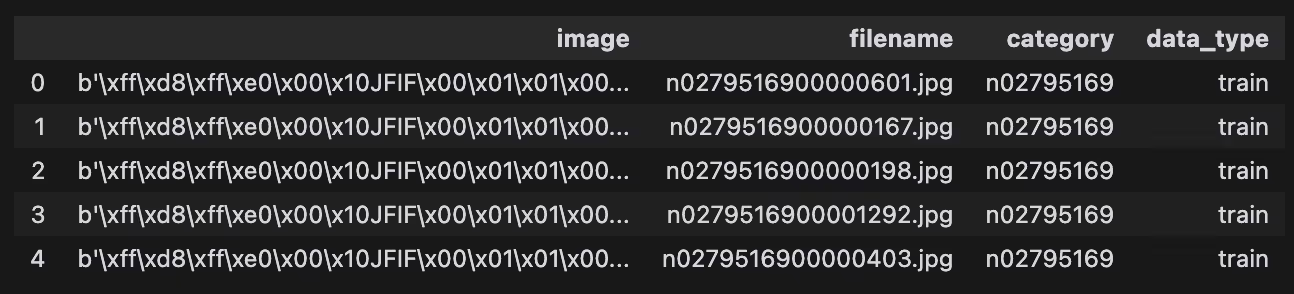
The benefits of this approach are numerous:
- Storage Efficiency: The columnar storage and compression techniques employed by Lance result in significantly reduced storage requirements, making it an ideal choice for handling large-scale image datasets.
- Fast Data Loading: The optimized data layout and indexing capabilities of Lance enable lightning-fast data loading times, improving the overall performance and responsiveness of your machine learning pipelines.
- Random Access: The ability to selectively load specific data subsets from the Lance dataset allows for efficient data augmentation techniques and custom data loading strategies tailored to your unique requirements.
- Unified Data Format: Lance can store diverse data types, such as images, text, and numerical data, in a single, streamlined format. This flexibility is invaluable in machine learning, where different modalities of data often need to be processed together.
By adopting the Lance format, we can literally elevate our machine learning workflow to new heights, unlocking unprecedented levels of efficiency, performance, and flexibility. Take the first step by running the provided script and converting your image datasets to the Lance format – the future of machine learning data management is awaiting for you, who knows if you find your second love with lance format.