Introduction
SAM (Segment Anything) model by FAIR, has set a benchmark in field of Computer Vision. It seamlessly segments objects image with zero-shot classification. Whereas CLIP (Contrastive Language Image Pretraining) model by OpenAI, which is trained on numerous (image, text) pairs is really useful in Q&A with images.
We are going to leverage both of these models to create a “Search Engine” for an image. We will be using both the models in symphony to create a search engine which can effectively search within a given image and a given natural language query.
Semantic Searching with Natural Language
Enabling semantic search within an image requires multiple steps. This process is akin to developing a basic search engine, involving steps such as indexing existing entities, calculating the distance between the user query and all entities, and then returning the closest match.
Here’s a visual representation of the process

The process consists of four key steps:
- Instance Segmentation: Utilizing the SAM model, we extract entities from the image through segmentation.
- Embedding Entities: open_clip is employed to convert the identified entities into embeddings.
- Embedding User Prompts: open_clip is also utilized to convert the provided text prompt into embeddings.
- Finding and Highlighting the Closest Entity: LanceDB is used to locate the entity closest to the text prompt. Subsequently, OpenCV is applied to highlight the edge of the identified entity within the original image.
Implementing the Search functionality
Follow along with the Colab notebook. Now, let’s dive right into creating it.
I. Create the Segmentation to extract the entities.
Download the Image
url = 'https://w0.peakpx.com/wallpaper/600/440/HD-wallpaper-john-wick-with-mustang.jpg'
img_uuid = download_image(url)
We will be using Open_Clip, which can be install using pip install open-clip-torch.
Load the weights for SAM.
import requests

url = 'https://dl.fbaipublicfiles.com/segment_anything/sam_vit_h_4b8939.pth'
response = requests.get(url)

with open('sam_vit_h_4b8939.pth', 'wb') as f:
    f.write(response.content)
Get the Image segmentation
#load SAM
from segment_anything import SamAutomaticMaskGenerator, sam_model_registry
sam = sam_model_registry["vit_h"](checkpoint="sam_vit_h_4b8939.pth")

#extract the segmentation masks from the image
def get_image_segmentations(img_path):
	input_img = cv2.imread(img_path)
	input_img = cv2.cvtColor(input_img, cv2.COLOR_BGR2RGB)
	mask_generator = SamAutomaticMaskGenerator(sam)
	masks = mask_generator.generate(input_img)
	return masks
Display the Segmentation Masks
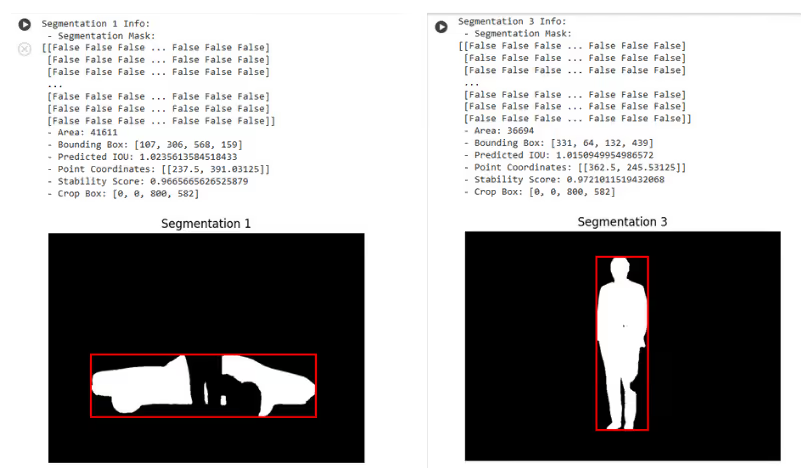
II. Convert the entities into embeddings.
To convert the entities into embeddings, we will be using CLIP model.Get the embeddings of the segmented images.
def get_image_embeddings_from_path(file_path):
	image = preprocess(Image.open(file_path)).unsqueeze(0)
	# Encode the image
	with torch.no_grad():
		embeddings = model.encode_image(image)
    embeddings = embeddings.squeeze() # to squeeze the embeddings into 1-dimension
	return embeddings.detach().numpy()
III. Convert the text prompt into embeddings.
text = tokenizer(user_query)
k_embedding = model.encode_text(text).tolist()  # Use tolist() instead of to_list()
# Flatten k_embedding to a List[float]
k_embedding_list = flatten_list(k_embedding)
IV. Find the Closest match and highlight.
# initialize the database
uri = "data/sample-lancedb"
db = lancedb.connect(uri)

# composite call to the functions to create the segmentation mask, crop it, embed it and finally index it into LanceDB
def index_images_to_lancedb(img_uuid):
    img_path = img_uuid + '/index.jpg'
    source_img = cv2.imread(img_path)
    segmentations = get_image_segmentations(img_path)  # get the segmentations

    for index, seg in enumerate(segmentations):
        # crop the image by bbox
        cropped_img = crop_image_with_bbox(crop_image_by_seg(source_img, seg['segmentation']), seg['bbox'])
        c_img_path = img_uuid + '/{}.jpg'.format(index)
        cv2.imwrite(c_img_path, cropped_img)
        embeddings = get_image_embeddings_from_path(c_img_path)  # embed the image using CLIP
        seg['embeddings'] = embeddings
        seg['img_path'] = c_img_path
        seg['seg_shape'] = seg['segmentation'].shape
        seg['segmentation'] = seg['segmentation'].reshape(-1)

    seg_df = pd.DataFrame(segmentations)
    seg_df = seg_df[['img_path', 'embeddings', 'bbox', 'stability_score', 'predicted_iou', 'segmentation', 'seg_shape']]
    seg_df = seg_df.rename(columns={"embeddings": "vector"})
    tbl = db.create_table("table_{}".format(img_uuid), data=seg_df)  # index the images into table
    return tbl
Search Function
# find the image using natural language query
def search_image_with_user_query(vector_table, img_id, user_query):

    text = tokenizer(user_query)
    k_embedding = model.encode_text(text).tolist()  # Use tolist() instead of to_list()
    # Flatten k_embedding to a List[float]
    k_embedding_list = flatten_list(k_embedding)

    target = vector_table.search(k_embedding_list).limit(1).to_df()
    segmentation_mask = cv2.convertScaleAbs(target.iloc[0]['segmentation'].reshape(target.iloc[0]['seg_shape']).astype(int))

    # Dilate the segmentation mask to expand the area
    dilated_mask = cv2.dilate(segmentation_mask, np.ones((10, 10), np.uint8), iterations=1)

    # Create a mask of the surroundings by subtracting the original segmentation mask
    surroundings_mask = dilated_mask - segmentation_mask

    # Create a highlighted version of the original image
    path = '{}/index.jpg'.format(img_id)
    highlighted_image = cv2.imread(path)
    highlighted_image[surroundings_mask > 0] = [253, 218, 13]

    cv2.imwrite('{}/processed.jpg'.format(img_id), highlighted_image)

    # Display the image
    display(Image(filename='{}/processed.jpg'.format(img_id)))
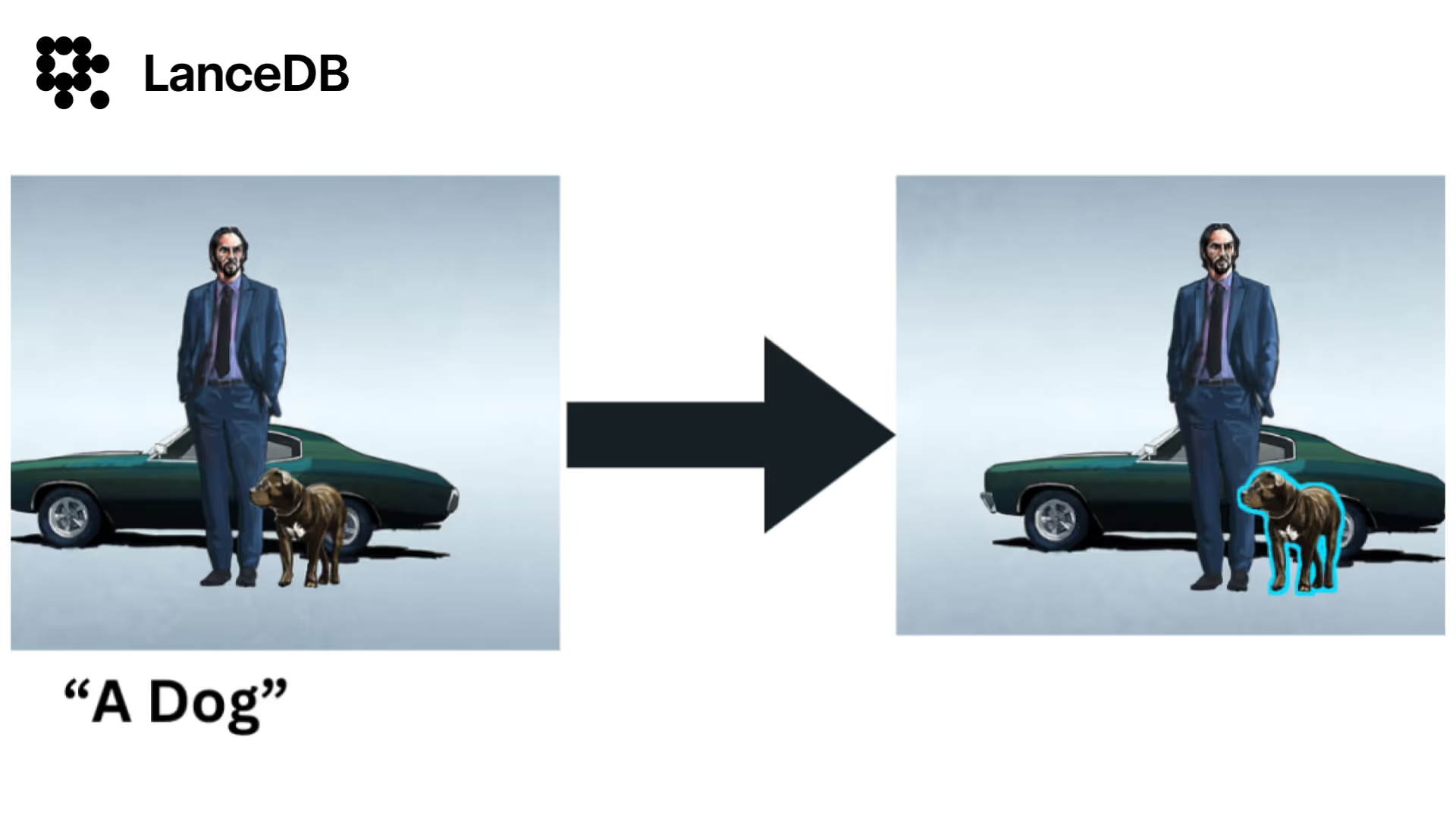
Let’s search in the Image with a user query
# index the downloaded image and search within the image
tbl = index_images_to_lancedb(img_uuid)
search_image_with_user_query(tbl, img_uuid, 'a dog')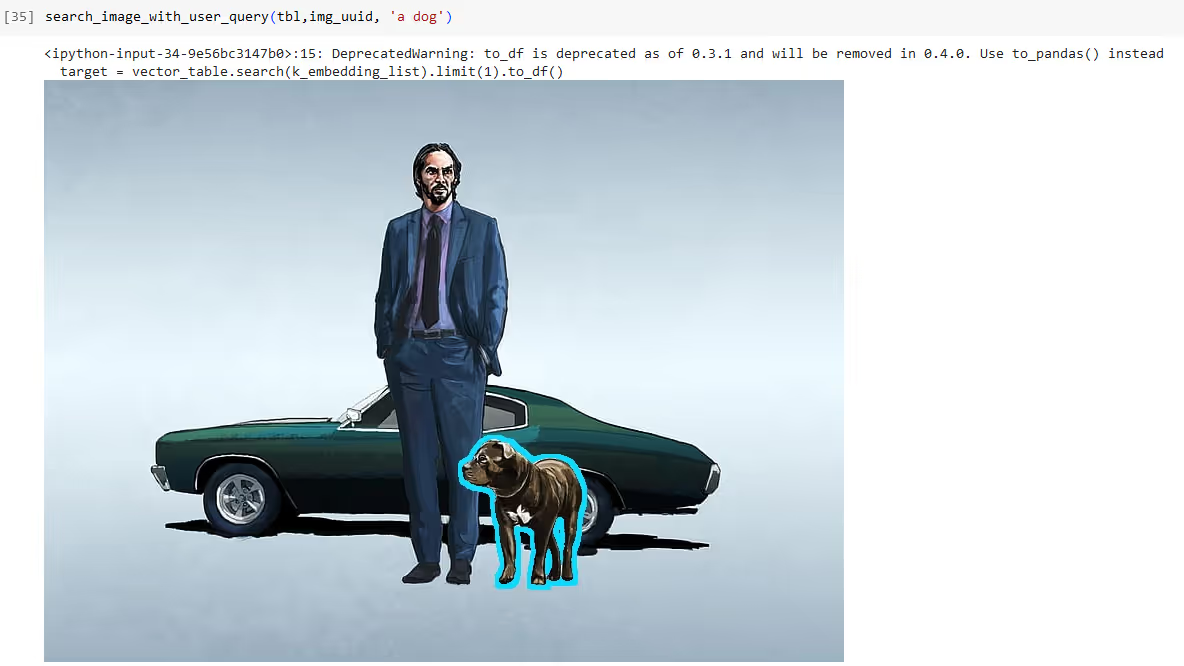
Visit our LanceDB repo if you wish to learn more about LanceDB python and Typescript library. For more applied GenAI and VectorDB applications, examples and tutorials visit VectorDB-Recipes. Don’t forget to leave a star at the repo.
For more such applied GenAI and VectorDB applications, examples and tutorials visit
Lastly, for more information and updates, follow our LinkedIn and Twitter.