
Most teams working with multimodal data eventually write some version of the same script. It opens a folder, bucket, or dataset of images, loops over them, runs a model, and writes the outputs to a sidecar JSON file, a second table, or a Parquet file named embeddings_final_v3 . This works fine until the model changes, the data grows, or a second feature is needed. Then the script starts accumulating retry logic, batching, checkpointing, and a rudimentary scheduler, while the derived features drift out of sync with the source data. What began as a simple script has quietly become a distributed feature-engineering pipeline that now has to be maintained.
LanceDB's feature engineering package, Geneva, is the answer to that script. Instead of writing a pipeline, you declare a Python function (a UDF) that computes one feature from one or more existing columns. You attach it to a LanceDB table as a new column, and LanceDB handles the backfill by distributing the work, batching execution, checkpointing progress, and writing the results beside the source data. The raw bytes, derived features, and vector indexes that make them searchable all live in the same table.
To make LanceDB feature engineering easy to try, we built geneva-examples, a repository of self-contained, runnable pipelines for images, video, and PDFs. In this post we'll run its image pipeline end to end, then take the CLIP embedding step and rebuild it from scratch with plain feature engineering API calls and a folder of images. The repo is a convenience layer, and a fairly thin one. The API underneath is small, and once you've seen it you can write UDFs for your own data without any of our example code. The payoff is what this replaces. By the end, you'll know how to swap the script from the opening paragraph for a handful of API calls that run unchanged from your laptop to a GPU cluster.
A quick walkthrough
The repository is designed to be a "clone and run" experience:
git clone https://github.com/lancedb/geneva-examples.git
cd geneva-examples
uv sync
Everything runs in one of two modes. With no configuration you get local mode: LanceDB connects to an on-disk Lance database at ./local_db and spins up a local runtime to execute backfills on your CPU. There's no cloud account or cluster involved, and the examples are tuned to fit in about 2 GB of RAM. If you add a config.yaml with LanceDB Enterprise credentials, the same commands run in enterprise mode and submit the same backfills to remote GPU workers. The UDFs, schemas, and orchestration code are identical in both modes; we'll see where the fork lives shortly.
The image pipeline is four commands:
uv run ingest-images   # create the table, load 75 pet photos from Hugging Face
uv run lightweight     # backfill file_size + dimensions (cheap CPU UDFs)
uv run embed           # backfill OpenCLIP embeddings + text-to-image search demo
uv run caption         # backfill BLIP captions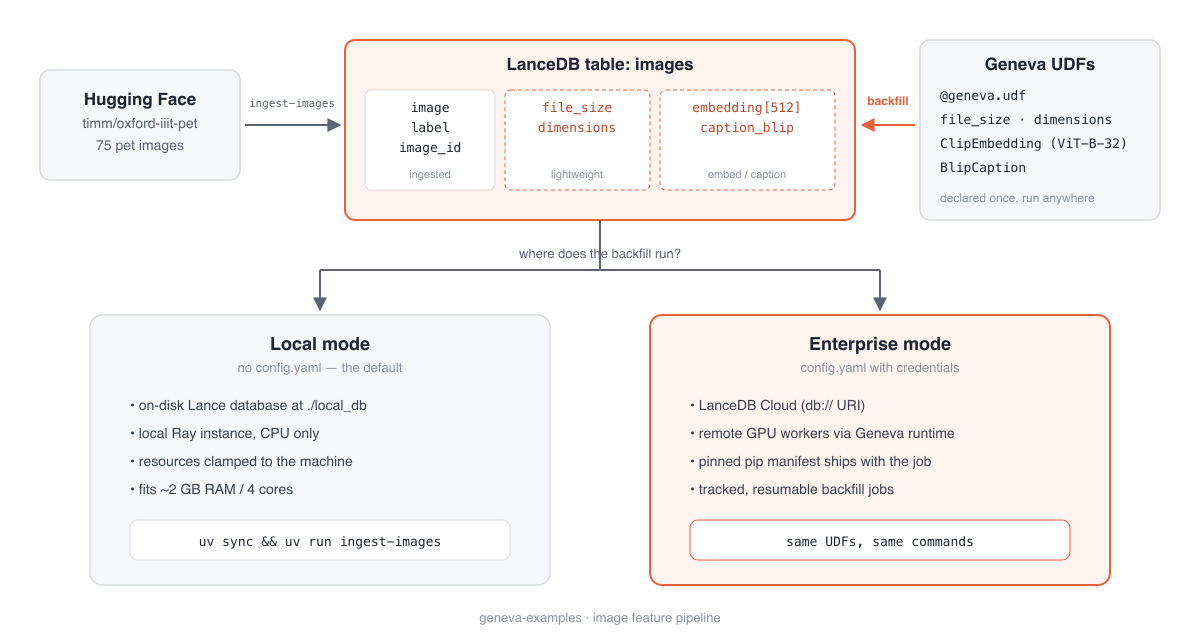
A few minutes later, uv run stats shows what the pipeline produced. There's one row per image, and each step added a column next to the bytes it read:
[images]
  rows: 75
  schema:
    image: binary
    label: int64
    image_id: string
    file_size: int64
    dimensions: struct<width: int32, height: int32>
    embedding: fixed_size_list<item: float>[512]
    caption_blip: string
  feature columns:
    file_size: 75/75 populated
    dimensions: 75/75 populated
    embedding: 75/75 populated
caption_blip: 75/75 populatedNote that there's no object store of image files with a metadata table pointing at it. Lance is a columnar format built for multimodal data, so the JPEG bytes sit in the image column and every feature derived from them lands in the same table. The embed step finishes by embedding a text query with the same CLIP model and searching the freshly built column:
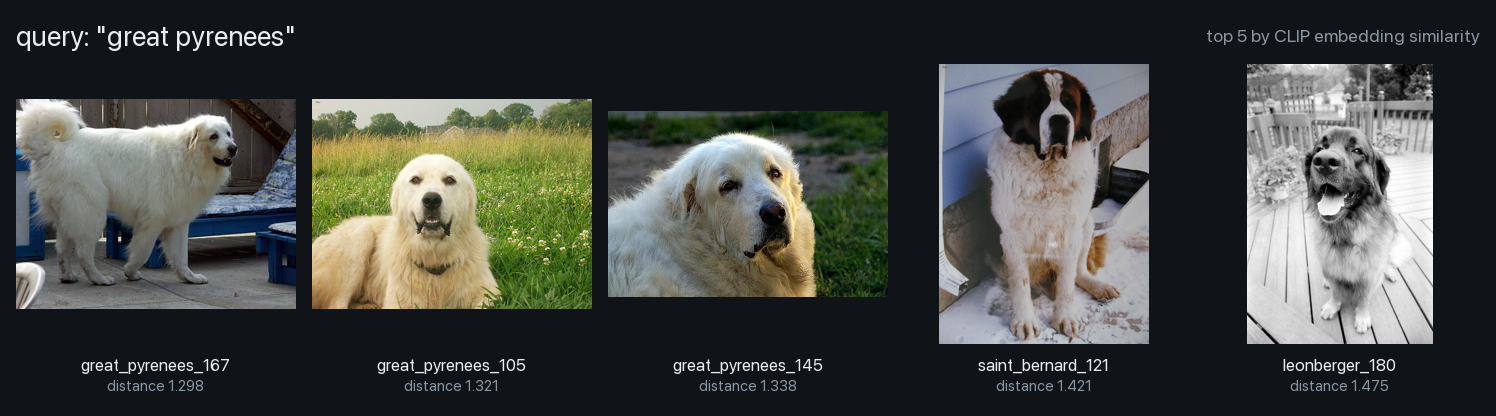
uv run embed --query-text "great pyrenees"embedding_query great pyrenees matches 5
embedding_sample
image_id label
------------------ -----
great_pyrenees_167 15
great_pyrenees_105 15
great_pyrenees_145 15
saint_bernard_121 28
leonberger_180 19The table contains no text describing its contents, only labels and pixels. Still, the 75-image sample holds exactly three Great Pyrenees, and they take the top three spots, followed by a Saint Bernard and a Leonberger, the most Pyrenees-looking dogs the table had left. There was no separate vector database and no export step; the embeddings became searchable the moment the backfill committed, because they're a column in the same table as the images they describe.
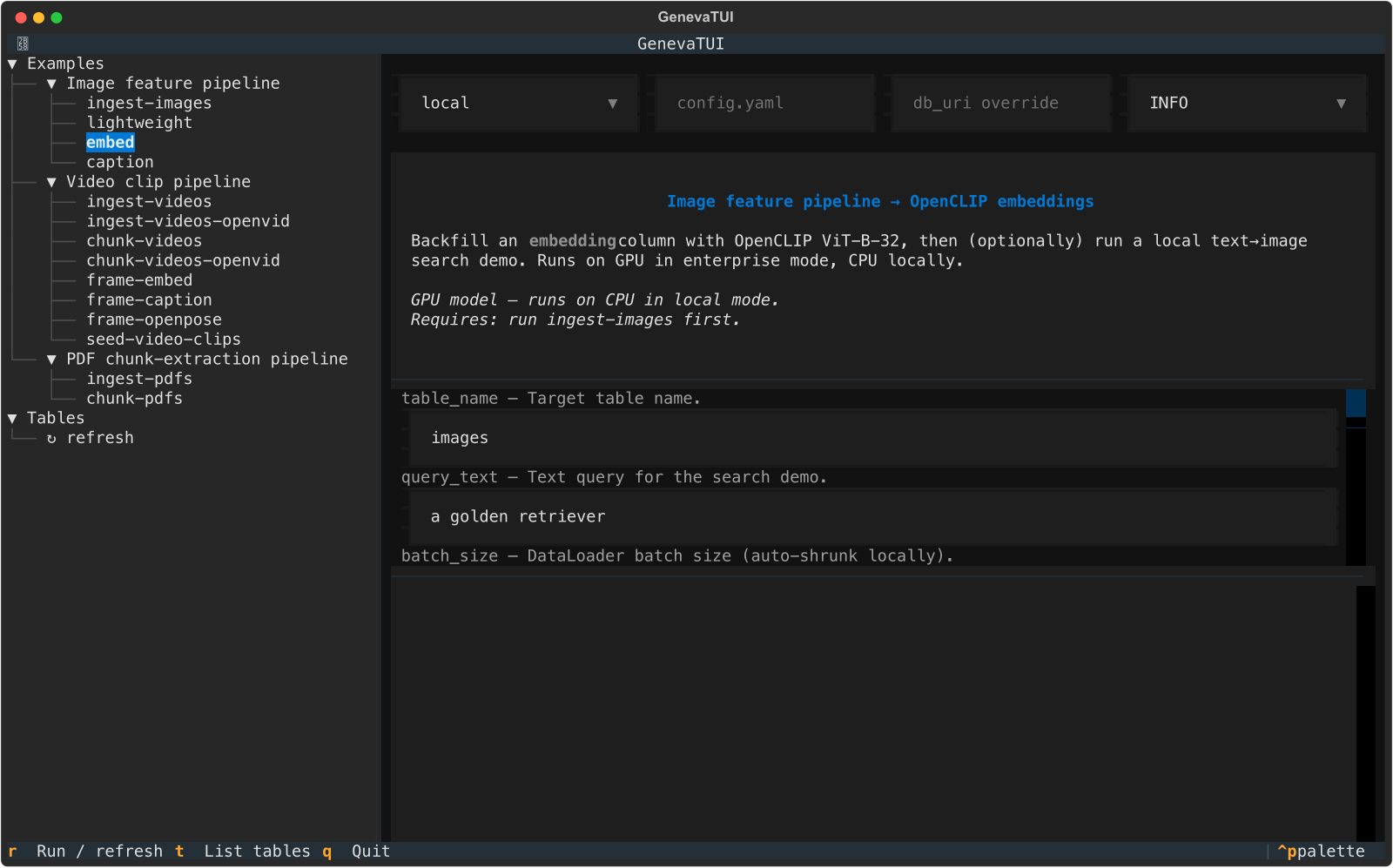
The repo has more to explore, including a Textual TUI (uv run tui) that runs every step interactively with live logs and a table browser, video and PDF pipelines, and ops commands for jobs and cleanup:
That covers the demo. The rest of the post walks through what those commands actually did, because none of it requires the repo. Every capability they used is available as a plain API call from your own code.
Rebuilding the embedding step from scratch
Let's reimplement uv run embed without the geneva_examples package, the generated CLIs, or the spec files. We'll use one Python file, the geneva library, and a folder of images, and along the way you'll meet every API call the demo was built on.
Connect to a database
from pathlib import Path
import geneva

db = geneva.connect(Path("./my_db"))        # local: an on-disk Lance database
That's all it takes to connect to a local database on your laptop. Connecting to LanceDB Enterprise instead is the same call pointed at a remote target, this time with your credentials:
db = geneva.connect(
    "db://my-database",                     # LanceDB Enterprise
    host_override="https://your-geneva-host",
    api_key="your-api-key",
    region="us-east-1",
)
LanceDB picks the connection class from the URI. A filesystem path gives you a local NativeConnection, while a db:// URI gives you a RemoteConnection backed by the Enterprise runtime. Everything after this line is identical in both. The repo's config.yaml and connect() helper exist to manage this one fork, which is most of the difference between prototyping on a laptop and running on a cluster.
Your data: bytes are just another column
The demo loaded its images from a Hugging Face dataset, but the source could be any other directory, local or remote. Getting them into a table is a single create_table call:
photos = sorted(Path("~/Pictures/pets").expanduser().glob("*.jpg"))
tbl = db.create_table(
    "photos",
    data=[{"image_id": p.stem, "image": p.read_bytes()} for p in photos],
    mode="overwrite",
)
The JPEG bytes go into the table itself, not into a bucket that the table's columns point to. In LanceDB, the raw images, the features derived from them, and the vector indexes over those features all live in one table. They're versioned together, so each table snapshot captures the pixels and every transformation applied to them at the same point in time. This makes it possible to trace each embedding back to the image and data version that produced it.
The alternative, images in object storage with a metadata table holding paths, splits that history across two systems that have to be kept in step by hand, and they drift apart the moment one is updated without the other. Keeping everything in one place also keeps the later steps simple, as each feature reads columns from this table and writes a new column back, with no paths to resolve and nothing to reconcile between stores.
The core loop: declare, attach, backfill
Start with the cheapest kind of feature, one computed straight from an existing column with no model involved. file_size is about as simple as it gets, and it's enough to show the whole pattern end to end:
from geneva import udf

@udf
def file_size(image: bytes) -> int:
    return len(image)

tbl.add_columns({"file_size": file_size})   # declare the UDF-backed column
tbl.backfill("file_size")                   # materialize it
The decorator infers nearly everything. The argument name image binds the input to the table's image column, and the type hints (bytes in, int out) give LanceDB the Arrow types. add_columns registers the column on the table's schema, and backfill computes it by splitting the table into tasks, running them in parallel, and checkpointing progress along the way. On a laptop, wrap backfills in with db.local_ray_context(): so the library provisions (and cleanly tears down) a local runtime. Against Enterprise, the same backfill call submits a managed job to the remote cluster.
That loop of declare, attach, backfill is the whole workflow. Everything else in this post is a bigger function and more rows.
Adding a model-backed feature: CLIP embeddings
The file size feature was essentially free to compute. It's very common to compute features that need a model, which brings two additional demands the scalar file_size UDF didn't have. You have expensive per-worker state (the loaded model itself) and need to batch the computation so that the GPU isn't fed one image at a time. LanceDB handles both of these requirements with a class-based UDF:
import pyarrow as pa
from geneva import udf

@udf(
    data_type=pa.list_(pa.float32(), 512),   # Arrow type of the new column
    input_columns=["image"],
    num_cpus=4,
    num_gpus=0.5,                            # two of these can share one GPU
)
class ClipEmbedding:
    def __init__(self):
        self.model = None

    def setup(self):
        import open_clip
        import torch

        self.model, _, self.preprocess = open_clip.create_model_and_transforms(
            "ViT-B-32", pretrained="laion2b_s34b_b79k"
        )
        self.device = "cuda" if torch.cuda.is_available() else "cpu"
        self.model = self.model.to(self.device).eval()

    def __call__(self, image: pa.Array) -> pa.Array:
        import io

        import torch
        from PIL import Image

        if self.model is None:
            self.setup()
        batch = torch.stack([
            self.preprocess(Image.open(io.BytesIO(b.as_py())).convert("RGB"))
            for b in image
        ]).to(self.device)
        with torch.inference_mode():
            emb = self.model.encode_image(batch)
            emb = emb / emb.norm(dim=-1, keepdim=True)
        return pa.FixedSizeListArray.from_arrays(
            pa.array(emb.cpu().numpy().astype("float32").reshape(-1), type=pa.float32()),
            512,
        )
Three details in this class do most of the work.
State. Each worker process gets its own copy of the UDF instance, and that copy lives for the whole backfill. The setup() guard in __call__ is a lazy-initialization convention (the built-in UDFs use the same pattern). The first batch a worker sees pays the model-loading cost, and every batch after that reuses the loaded model. You get model caching across the whole job without writing any pooling code.
Batching. Because the input is annotated pa.Array, LanceDB hands __call__ a batch of rows at a time instead of a single value. Batched UDFs declare data_type explicitly, since there's no scalar hint to infer it from. Batches are where the throughput comes from. The UDF decodes, stacks, and runs the model over many images per forward pass.
Resources. num_cpus, num_gpus, and memory describe what one task needs, and the scheduler (a local runtime on your laptop, the GPU pool on Enterprise) figures out placement. num_gpus=0.5 means two embedding workers can share each GPU. Cluster configuration stays out of your code entirely.
One more pattern is worth noting. Every import lives inside the methods. A UDF is serialized and shipped to workers that don't have your project's source tree, so it has to carry everything it needs with it. If you write UDFs to be fully self-contained from day one, they're cluster-ready without changes.
The snippet above is the minimal version. The production-tuned variant in the repo (clip.py) adds a PyTorch DataLoader so image decoding overlaps GPU inference, null-row handling, TF32/bfloat16 autocast with torch.compile on CUDA, and tuned checkpoint and task sizing. None of that changes the shape of the class. It's throughput work, and it's there to copy when you need it.
You may not need to write the class at all, either. LanceDB ships built-in UDFs covering OpenCLIP and BLIP for images, document text extraction (the repo's PDF example uses these directly), Whisper transcription, and embedding providers for OpenAI, Gemini, and sentence-transformers. It only makes sense to write a custom class when you need a particular model or you want to tune it yourself.
Attach, backfill, search
The expensive column is materialized the same way as the cheap one:
tbl.add_columns({"embedding": ClipEmbedding()})
tbl.backfill("embedding", concurrency=8)     # 8 workers; on Enterprise, a managed job
Since the embeddings are a new column in the same table, there's nothing to export or sync before searching. You can embed the query text with the same model and search the column:
import open_clip
import torch

model, _, _ = open_clip.create_model_and_transforms("ViT-B-32", pretrained="laion2b_s34b_b79k")
tokenizer = open_clip.get_tokenizer("ViT-B-32")
with torch.no_grad():
    q = model.encode_text(tokenizer(["a dog in the snow"]))
    q /= q.norm(dim=-1, keepdim=True)

hits = tbl.search(q.squeeze().tolist(), "embedding").limit(5).to_list()
Everything we just wrote uses six platform calls: geneva.connect, create_table, @udf, add_columns, backfill, and search. That's the whole API surface behind this walkthrough, and it's all you need to add features to your tables.
What the repo provides
If the platform loop is six calls, what are the several thousand lines of code in the geneva-examples repo doing? It's mostly to do with ergonomics, and it's worth listing them below, because they're the parts you'd end up writing (or copying) for a pipeline of your own:
- A config file and mode fork (
core/config.py,connect()): the one-line local/enterprise choice above, resolved fromconfig.yamlor its absence. - Resource clamping (
resolve_resources,local_or): cloud-tuned defaults likenum_gpus=0.5and batch size 1024, shrunk automatically so the same UDF schedules on a 4-core laptop with no GPU. - Backfill orchestration (
backfill_column): drop-and-recompute vs. incremental semantics, waiting for schema visibility, and smoothing over small local/remote API differences. - Manifest builders: the pinned pip environments remote workers install (more on this below), skipped entirely in local mode.
- Generated CLIs and the TUI: every step declares its parameters once in a small spec, and both the
uv runcommands and the TUI forms are generated from it.
None of this is the platform itself; it's the scaffolding that makes the platform pleasant to work with day to day. You could write every piece of it yourself, and for a pipeline of your own you probably will, but it's helpful to see it factored out so you know exactly which parts are LanceDB and which parts are just convenience.
The one thing the repo can't provide is the UDFs themselves, because those are where your features live. And as the walkthrough above showed, they're ordinary Python functions and classes that you write once and run anywhere.
Beyond the first backfill
A real table rarely stays as it was when you first built it. New rows keep arriving, and a feature you computed last month often has to be recomputed when a better model comes along. Handling that gracefully is where most hand-rolled pipelines start to creak. With LanceDB, it's just a few arguments to backfill, which end up doing most of the work:
# Backfill is incremental by default: it only computes rows where the
# column IS NULL, so rerunning the same line picks up newly added images.
tbl.backfill("embedding")

# A SQL predicate scopes a backfill to a subset of rows:
tbl.backfill("embedding", where="file_size > 1000000")

# Limit a run to a couple of fragments to try a UDF before the full job:
tbl.backfill("embedding", num_frags=2)

# Commit partial results every 10 fragments so readers see progress on long jobs:
tbl.backfill("embedding", commit_granularity=10)
When a better model becomes available, you don't rebuild the entire table. You recompute just the relevant column values with the new UDF:
tbl.alter_columns({"path": "embedding", "udf": ClipEmbeddingV2()})
tbl.backfill("embedding", where="1=1")       # force recompute of every row
Another option is to backfill the new model into a second column and compare it against the old one before switching. The table just gets wider, and thanks to Lance's zero-cost data evolution, adding a column never rewrites the image bytes sitting next to it. For per-row failures like a corrupt image, UDF-level error policies such as on_error=skip_on_error() or retry_transient() decide whether a row is skipped, retried, or fails the job, which beats scattering try/except blocks through your UDFs.
Scaling to production without a rewrite
So far, everything has run on one machine with 75 images, CPU inference, and an on-disk database. That's the right place to develop a feature because debugging a tensor-shape bug or a bad Arrow type on a local dataset takes seconds per iteration. Real workloads are a lot bigger than 75 images, though. Sooner or later the same UDF has to run over millions of them, on hardware you don't manage yourself. The important part is that getting there doesn't require a rewrite. You point connect at your cluster and the same UDFs run. A few things change under the hood, and each is machinery you would otherwise have to build and maintain on your own.
The environment ships with the job. In local mode, workers share your driver's Python environment; remote workers don't. In enterprise mode you attach a pinned manifest to the UDF, and workers install exactly the versions your client expects:
from geneva.manifest import GenevaManifest

manifest = (
    GenevaManifest.create_pip("clip-embed")
    .pip(["geneva==0.14.0", "torch==2.12.0", "open-clip-torch==3.3.0", "pillow==12.2.0"])
    .build()
)

@udf(..., manifest=manifest)      # same class as before, plus one argument
class ClipEmbedding: ...
This is where writing self-contained UDFs pays off. The UDF carries its imports and the manifest pins its packages, so the worker needs nothing installed ahead of time.
Resource requests become real. The num_gpus=0.5 request that local mode clamps to zero is honored on the Enterprise GPU pool, where it schedules two CLIP workers per GPU. The settings the repo turns down for local runs (batch size 1024, eight DataLoader workers, concurrency 8) are the values the same UDF runs at in the cloud.
Backfills become managed jobs. A backfill over millions of rows runs for hours, and nobody wants to babysit it from a terminal. On Enterprise every backfill is tracked with an ID, status, and event log, available through conn.list_jobs() and conn.get_job() from any client and through the LanceDB Enterprise console. The repo's uv run jobs CLI is a thin wrapper over these same calls.
The upshot is that packaging, scheduling, and job tracking become the platform's problem instead of yours. You get the feature right locally, where iteration is fast, then run it at scale without building or maintaining any of that machinery yourself.
From a script's output to a shared source of truth
Although scale is an important factor, it's not the only bottleneck to moving a working local pipeline to production. The bigger shift when moving to production scale is what the table becomes. Once it leaves your laptop, it stops being the output of one person's script and turns into a shared, evolving source of truth that models, dashboards, and multiple teammates all read from.
This shift brings a new set of demands, and when using LanceDB Enterprise, each one is handled for you rather than hand-built. New images arrive and pick up the same enrichments through the incremental backfill default. A better embedding model comes out, and you can compute it into a second column and compare it against the first without disturbing production queries. Because storage and compute scale independently, the captioning and embedding jobs never fight over the same machine. Multiple teams read the table while backfills write to it, so jobs stay observable, resumable, and cancellable by someone who didn't start them. And every feature column traces back to the UDF version that produced it, so you always know how a given value was computed.
These are the concerns LanceDB Enterprise was designed to handle at petabyte-scale and beyond. The table-centric workflow stays as it looked in this post, but the operational machinery around it (job management, distributed execution, environment pinning, checkpointing) is built into the platform.
The image pipeline shown above is the simplest of the three examples. The same primitives carry the heavier modalities in the repo. The video example chunks source videos into clips with a chunker, a UDTF that yields many rows per input row, then backfills per-frame CLIP, BLIP, and OpenPose features, including a variant that reads the 1M-clip OpenVid dataset by blob reference so video bytes never move through the client. The PDF example backfills page text and chunks using built-in UDFs, with no custom code at all.
Spend your time on features, not plumbing
The patterns shown in this post are small enough to state in a single sentence. Put your multimodal data in a LanceDB table, express each feature as a Python UDF, and let LanceDB backfill materialize the columns, locally while you develop and on LanceDB Enterprise when you scale. The API underneath is just six calls, and the UDFs are ordinary Python functions with a decorator.
The real value is in what this approach helps you avoid. There are no sidecar files to track, no bespoke batch scripts to maintain, no separate vector store to keep in sync, and no rewrite standing between your prototype and production. What's left is the part that's genuinely yours to build, the features themselves.
geneva-examples gets you from git clone to text-searching CLIP embeddings in about ten minutes, and its production-tuned UDFs are worth borrowing when you write your own. Try the repo locally, or talk to us about LanceDB Enterprise when you're ready to run the same workflows on managed GPU infrastructure.